Five TradingView scripts that put rules and numbers on your chart.
A compounding ladder, a DCA planner, a swing tracker, and a volume and fair-value indicator with its strategy version. Each one applies rules you configure and shows the arithmetic. They inform your decisions; they don't make them for you.
One-time plans from $49 · FlashBar Terminal included · 7-day money-back guarantee
TradingView · Pine Script7-day money-back guarantee One-time payment Access within 24h
The chart is a screenshot of FlashDCA Trinity on past BTCUSD daily prices, with its statistics panel hidden; its figures are the tool's bookkeeping of a modeled plan, not results. The scripts are analysis tools, not financial advice or trade calls. Trading involves risk of loss. Read the risk disclaimer.
BTCUSD · 1DFlashDCA Trinity
Runs inside TradingViewInvite-only accessFlashBar Terminal for WindowsOne-time plans7-day money-back
The problem
Plans made by feel are hard to check.
Adding on dips by feel, with no rule for how much or how often.
No record of what a plan would have spent, held and averaged so far.
Swings judged by eye instead of measured: how far, how long, how rough.
Volume read as a bar height, not as pressure, fair value or absorption.
The approach
Written rules, visible bookkeeping.
FlashBar is five Pine scripts that apply rules you configure and show the arithmetic on your chart: a compounding ladder at new closing lows and highs, a daily DCA planner with a modeled ledger, a swing tracker that measures every leg, and a volume and fair-value indicator with a strategy version for TradingView's Strategy Tester. Each script's TradingView page explains how it works and lists its limits.
These are analysis tools, not trade calls or predictions. Markets carry risk, and you make every decision.
The scripts
Five scripts, three plans
Every script runs inside TradingView as an invite-only publication on your account. Each one does a specific job, and its TradingView page documents its rules and limits.
100-Bar Low/High Compounding Ladder
Accumulation ladder · LH100
Every plan
Model a ladder that adds at new closing lows and trims at new closing highs, and see its cost basis.
ILLUSTRATION · SYNTHETIC · 12 BARS
From a start date you choose, every bar that closes at the lowest close of the last 100 bars (the lookback is adjustable) is a closing-low step, where the model adds units, and every bar that closes at the highest close is a closing-high step, where the model reduces units if it holds any. Each step is sized with a compounding rule, and the script keeps a running average-cost ledger of the modeled position. It places no orders and does not connect to a broker.
Compounding sizes: each further step in a leg grows with its percent distance from the previous step (sensitivity 0 gives fixed sizes).
Average-cost basis line, price-versus-basis shading, and a totals table: bought, sold, net invested, basis, units held.
Hover a step label for its arithmetic: the close, the percent change from the previous step and the units.
Best for: planning a rules-based accumulation schedule, on any timeframe
FlashDCA Trinity
DCA planner · 1D
Pro & Elite
Turn a yearly budget into a daily amount, pace it with one of three modes, and compare it with a plain fixed-amount DCA.
SCREENSHOT · BTCUSD 1D
Enter a yearly budget and a start date. Trinity computes the amount your plan would put into the asset each day, weighted toward deeper drawdowns and normalized to your budget, and keeps a modeled ledger of money invested, units held, average cost and current value. Its three modes (DCA, BULL MARKET and PRECISION DCA) can be compared with a plain fixed-amount DCA from the same start date. It places no orders.
Today's modeled amount and a weekly figure in a compact panel; optional Main Statistics with a Basis line and markers.
Optional modules: Bear Market Amplifier, a Daily Spend Cap, modeled Profit-Taking, a Simple DCA comparison line and a margin illustration.
Multi-Asset View runs the same plan on up to 10 symbols side by side; Recent Transactions lists the last 10 modeled purchase days.
Best for: daily (1D) charts of markets that trade every day, such as crypto. It runs on 1D only.
FlashBar Swing Tracker
Swing measurement
Pro & Elite
Map swings from closing extremes and measure every leg.
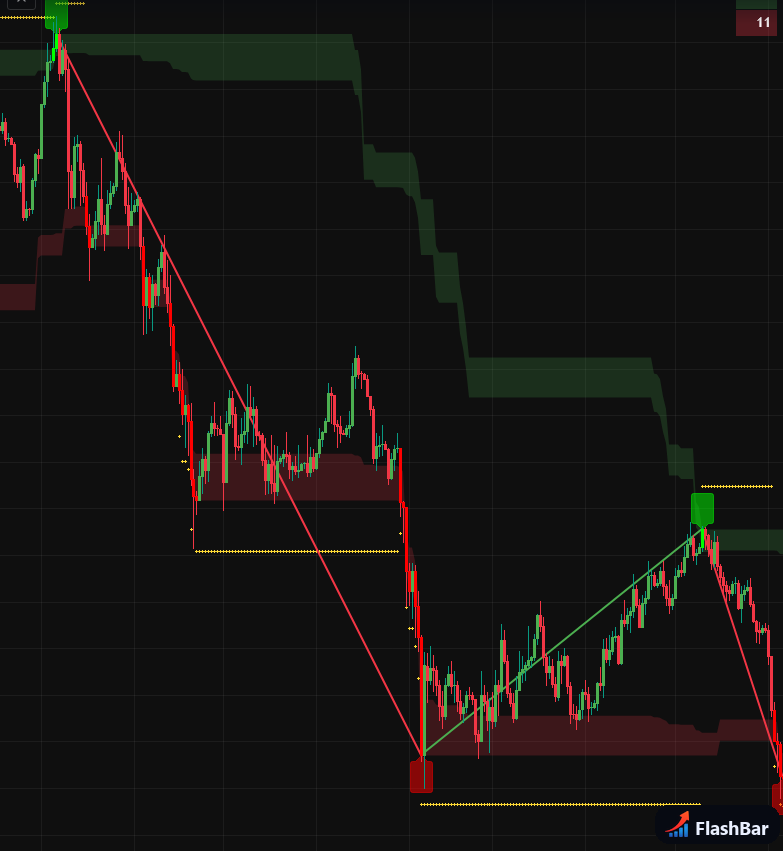
SCREENSHOT
A swing point is a bar whose close is the highest or lowest close of the last 100 bars (adjustable). Swing Tracker draws the legs between these points, attaches a statistics bubble to each leg, places an ATR-based reference level at each new extreme and colors the bars. It measures; it does not say whether, when or which way to trade.
Hover a leg's bubble for its start and end, change in price and percent, duration in bars, rate, and path measures.
Decile shading marks the top and bottom 10% of the lookback closing range, so you can see when the close is inside either band.
Optional tables: a position size for a risk amount you set, the recency of closing extremes on four timeframes, and a 28-pair forex screener.
Best for: measuring swing structure on any timeframe
FlashBar Flow Engine
Volume & fair value
Elite
Read estimated volume pressure against an anchored fair-value band.
An overlay that turns price and volume bars into linked readings: estimated buying and selling pressure (from where each bar closes inside its range), an anchored VWAP with 1 and 2 standard-deviation bands, a volatility regime (STABLE, UNSTABLE or HALT), a sweep classifier, absorption shelves, and a composite score that must hold for a set number of bars before a confirmation marker prints. At each confirmation it draws three reference levels from a random-walk touch model; their percentages are model outputs, not measured odds.
Buying and selling volume are estimated from OHLCV bars, not read from tick or order-book data.
A dashboard with the score, pressure, distance from fair value in standard deviations, the regime and a sweep count.
A confirmation means the modules agreed under your settings. The script has no exit, stop or position-size logic.
Best for: symbols with real volume data, on any timeframe
FlashBar Flow Strategy
Strategy Tester
Elite
The Flow Engine model with fixed entry, stop and exit rules, for backtesting.
The strategy version of Flow Engine. It uses the same analysis modules and adds fixed rules for simulated entries (a market order, or three limit rungs), a protective ATR-based stop and an optional take-profit at the far fair-value band, so the model can be studied in TradingView's Strategy Tester. Long only by default, with a Long + Short option.
Adjust the direction, ladder entries, stop distance and take-profit option, then read the Strategy Tester report.
Commission, order size and other defaults sit in the Properties tab, where you can set them to your own costs.
Strategy Tester reports are hypothetical simulations on past data. They do not predict future results.
Best for: studying the Flow Engine model on historical data
FlashBar Terminal
Windows app
Every plan
A local market terminal that runs on your own PC.
Quotes, charts, news, SEC filings, options chains, a screener, a watchlist, earnings and economic calendars, price alerts and a paper-trading simulator, from free third-party sources that FlashBar does not control. Optionally, it shows balances and positions from your own broker or exchange accounts using API keys you add; the keys stay on your PC and are used only to read, so use read-only keys. It is a separate Windows program, not a TradingView script. Download it from your receipt page after checkout.
One .exe to download and double-click; nothing else to install.
Licensed to your purchase; a refund revokes the license.
Every script is an analysis tool. None of them connects to a broker or places real orders, and none of them tells you what to buy or sell.
On a real chart
FlashDCA Trinity on a BTCUSD daily chart
The average-cost Basis line and the recent transactions table of a modeled plan. Every number is the tool's bookkeeping of that plan on past prices: what it would have bought, at what price, and its average cost. It is not a result and not a forecast.
Screenshot of FlashDCA Trinity on past BTCUSD daily prices. Figures are the tool's bookkeeping of a modeled plan, not results; the statistics panel is hidden in this image. Captured from an earlier build: the current version adds a Date column and headers to the transactions table.
Free tool, no sign-up
Size a trade to your risk
A free position-size calculator on this page. Set your account, risk, entry and stop to see the position size, the leverage it would need, and the prices at 1R, 2R and 3R. It is not one of the TradingView scripts.
$
%
$
$
×
Risk amount-
Stop distance-
Position size-
Position value-
Required leverage-
1R price
-
2R price
-
3R price
-
Math runs entirely in your browser. Nothing is sent anywhere. For information only; not financial advice. On the chart, FlashBar Swing Tracker's optional position-size row does a similar risk-based calculation from its ATR level.
Getting started
From checkout to chart in three steps
No broker account and no code to paste. The scripts run inside the TradingView account you already use, and FlashBar Terminal runs on your Windows PC.
1
Pick a plan
Starter, Pro or Elite, each a one-time price. Every plan includes FlashBar Terminal and the 7-day money-back guarantee.
2
Pay and enter your TradingView username
Checkout through Stripe asks for your TradingView username. Enter it exactly as it appears on your TradingView profile, without the @. If checkout did not collect it, you can add it on your receipt page.
3
Get invite-only access and the Terminal
Within 24 hours your username is added to your plan's invite-only scripts. In TradingView, open Indicators → Invite-only scripts and add them to a chart. Download FlashBar Terminal from your receipt page.
Access is keyed to your TradingView username (not your email) and is added within 24 hours. Checkout takes you to your receipt page; bookmark it, because it holds your access status and your Terminal download.
5
Invite-only TradingView scripts: a compounding ladder, a DCA planner, a swing tracker, and a flow indicator with its strategy version
3
One-time plans
24h
Access window
7-day
Money-back guarantee
Why trust FlashBar
Straight with you, by design
The trading-tools space is full of hype and anonymous accounts. Here's how we do the opposite.
AV
Andrew Volgenin
Founder · @andrewkool
The real person behind FlashBar, not a faceless brand. I build and maintain every script myself, price them once and plainly, and back every plan with a 7-day money-back guarantee. No hype and no profit promises. Just focused tools and straight answers.
Secure checkout through Stripe; we never ask for crypto or gift cards.
No recurring charges, no fake countdown timers, no "only 3 spots left" pressure.
A clear risk disclosure, shown openly, not buried.
Honest limits: each script's TradingView page lists what it cannot do.
Included with every plan
FlashBar Terminal runs on your own PC.
FlashBar Terminal is a local market terminal for Windows with quotes, charts, news, SEC filings, options chains, a screener, a watchlist, earnings and economic calendars, price alerts, and a paper-trading simulator.
How you get it
1
Buy any plan: Starter, Pro or Elite, each a one-time price.
2
After checkout you land on your receipt page. FlashBar Terminal is listed there next to your TradingView access status.
3
Download the Terminal (a single Windows .exe) and double-click it. No setup, nothing else to install.
License and delivery
The download is tied to your purchase, so there is usually nothing to enter; if the Terminal cannot find its license, it asks once for your receipt link. On start and every six hours it confirms the license with FlashBar, sending only your purchase id, the product name and the version, and it keeps working offline for up to seven days after a good check. A refund or chargeback revokes the license and deactivates the download link. Windows may show a SmartScreen prompt the first time, because the program is not code-signed.
FlashBar Terminal is an analysis tool with user-configured settings. It is not investment advice, not a trading system, not a recommendation to buy or sell any asset, and not a promise of performance. Market data comes from free third-party sources that FlashBar does not license or control, and it may be delayed, incomplete, wrong, rate-limited, or unavailable; verify data before acting.
Pricing
Pay once. Pick your scripts.
Each plan is a one-time purchase. Checkout asks for your TradingView username, and access to your plan's invite-only scripts is added to that username within 24 hours. Every plan includes FlashBar Terminal.
Checkout asks for your TradingView username (required). Access is invite-only: it is added to that username within 24 hours, and the scripts then appear in TradingView under Indicators → Invite-only scripts. You do not receive the Pine source code.
One-time payment Secure checkout via Stripe Invite-only access within 24h FlashBar Terminal included
7-day money-back guarantee · a refund removes TradingView access and the Terminal license
Check before you buy
Verify us, not our adjectives
Anyone can paste five-star quotes. Here is what you can check yourself before you pay.
A real, named author
FlashBar's scripts are published under FlashBar's public TradingView profile, and the person behind them is named on this page.
No fabricated testimonials or reviews. As verified customer reviews come in, we'll feature real ones here.
FAQ
Questions, answered straight
Which platform do I need? Do the scripts work on MetaTrader, ThinkorSwim or NinjaTrader?
The five scripts are Pine Script publications that run only on TradingView. They do not work on MetaTrader (MT4/MT5), ThinkorSwim, NinjaTrader or any other platform. You need a TradingView account, and a free one works (see the free-plan question below). FlashBar Terminal is separate: a program for your Windows PC.
How do I get access after I pay?
Checkout asks for your TradingView username. Enter it exactly as it appears on your TradingView profile, without the @. Access to your plan's invite-only scripts is added to that username within 24 hours. Then open TradingView, go to Indicators → Invite-only scripts, and add them to a chart. If checkout did not collect a username, you can enter it on your receipt page. If you entered the wrong one, email support@flashbar.org.
Do I get the Pine Script source code?
No. The scripts are delivered as invite-only TradingView publications: TradingView adds them to your account and the code stays closed. There are no files to download or paste. Access is tied to one TradingView username.
Can I use a free TradingView account?
Yes. Invite-only scripts work on free TradingView accounts. TradingView's free plan limits how many indicators you can show on one chart at a time, and invite-only scripts count toward that limit. That is a TradingView limit; raising it means upgrading your own TradingView plan, which is separate from FlashBar.
What is FlashBar Terminal, and how do I get it?
FlashBar Terminal is a local market terminal for Windows with quotes, charts, news, SEC filings, options chains, a screener, a watchlist, earnings and economic calendars, price alerts and a paper-trading simulator. Every plan includes it. Download it from your receipt page and double-click it. It checks its license with FlashBar on start and every six hours and keeps working offline for up to seven days after a good check. Windows may show a SmartScreen prompt the first time because the program is not code-signed. More about the Terminal.
Which markets and timeframes do the scripts support?
The 100-Bar Low/High Compounding Ladder and FlashBar Swing Tracker run on any symbol and timeframe TradingView charts. FlashDCA Trinity runs on the daily (1D) timeframe only and is built for markets that trade every calendar day, such as crypto. FlashBar Flow Engine and FlashBar Flow Strategy estimate buying and selling from volume, so they need a symbol with real volume data; on symbols without volume (many indices, for example) their readings are empty or not meaningful.
Do the scripts repaint?
On the bar that is still forming, every script's values can change until that bar closes. After a bar closes, most outputs stay fixed, with documented exceptions: Swing Tracker keeps redrawing the current swing leg until the opposite extreme prints, and the Compounding Ladder and FlashDCA Trinity rebuild their modeled ledgers from the first bar the chart loads, so past values can shift if TradingView loads a different amount of history. FlashBar Flow Engine and FlashBar Flow Strategy remove an absorption shelf once a close breaks it and remove touch levels once price reaches them or their horizon ends, so past ones are not kept on the chart. Each script's TradingView page lists its exact behavior.
Do you send trade calls or alerts?
No. FlashBar does not send trade calls, alerts or messages, and the scripts do not tell you what to buy or sell. Some scripts include TradingView alert conditions you can set up yourself in your own TradingView account. The Compounding Ladder, FlashDCA Trinity and Swing Tracker can also send a message with the modeled event and price (for the Ladder and Trinity, also the modeled amount) to a webhook you choose; webhooks need a paid TradingView plan, and Trinity's message can fire before the daily bar closes. The message restates what the script computed under your settings; it is not a recommendation, and anything you connect to it is your responsibility.
Is it a one-time payment?
Yes. Each plan is a single payment in USD with no recurring charge. Your access stays active for as long as FlashBar operates, and at least 12 months from purchase. See the Terms for details.
Can I get a refund?
Yes. Every plan has a 7-day money-back guarantee: email support@flashbar.org within 7 days of purchase for a full refund. A refund removes your TradingView access and revokes your FlashBar Terminal license. The guarantee covers your purchase, not trading results. See the Refund Policy for full terms.
Do you promise profits or a win rate?
No, and we never will. The scripts are analysis tools that show rules and arithmetic on your chart; they do not predict prices or promise any result. Trading involves substantial risk of loss, and you are responsible for your own decisions. See our full risk disclaimer.
Trading involves substantial risk of loss and is not suitable for everyone. FlashBar scripts, FlashBar Terminal, the calculator and all related materials are analytical and educational tools only, not financial, investment, tax, or legal advice, and not a recommendation to buy or sell any instrument. FlashBar is not a registered broker-dealer or investment adviser. Any markers, levels, modeled figures or sample numbers are generated by formulas applied to market data and may be inaccurate or incomplete; they are not a promise of any outcome, and past, modeled or backtested performance does not indicate future results.
You alone are responsible for your trading decisions. Never trade with money you can't afford to lose. Read the full risk disclaimer →
Put rules and numbers on your chart.
Pick a plan, enter your TradingView username at checkout, and get invite-only access within 24 hours, with FlashBar Terminal included. You make every decision; the tools show the arithmetic.